Backup as a Service (BaaS)
Overview
SIM-Cloud BaaS creates block-level backups of volumes used by instances. A backup plan defines which volumes to protect, when backups run, how many restore points to retain, and whether the backups are stored locally or remotely.
BaaS protects volumes, not complete instances. Restoring a backup creates a new volume with the data and selected volume attributes. It does not recreate the original instance or its network configuration.
Use BaaS to:
schedule backups for one or more volumes;
retain multiple restore points;
store backups in local or remote backup storage;
restore a volume from a selected restore point;
monitor active and completed backup tasks;
receive notifications about backup events.
How backups work
The first successful run of a backup plan creates a full backup of the used blocks on each selected volume. Subsequent restore points contain blocks that have changed since the previous successful backup. This reduces the amount of storage and network traffic required for subsequent backups.
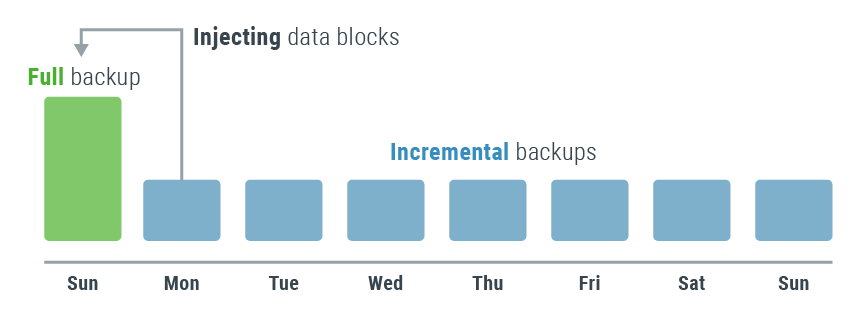
Restore points form an incremental chain associated with the source volume. Removing the service snapshot used by BaaS terminates that chain, so it cannot be extended with new incremental backups.
Note
Deleting a backup plan does not delete its existing restore points. The restore points remain available in the Backups section until they are explicitly deleted.
Storage options and performance
BaaS provides local and remote backup storage. Both storage types use Ceph and store backup data independently from the primary project storage.
Type |
Location |
Estimated restore throughput |
Recommended use |
|---|---|---|---|
Local |
In the same data center as the SIM-Cloud infrastructure |
300–600 GB per hour |
Faster restores when site-level isolation is not required |
Remote |
In a separate data center |
100–150 GB per hour |
Protection from incidents affecting the primary data center |
The overall estimated restore throughput is 100–600 GB per hour. Actual performance depends on the storage type, workload, volume size, network conditions, and current infrastructure load. These values are estimates and are not a guaranteed restore time.
Choosing a backup storage quota
When estimating the required quota, consider:
the used space on every volume to be protected;
the number of volumes;
the number of restore points;
the frequency and volume of changed data between backups.
Backup storage quotas are ordered in multiples of 10 GB. Because BaaS tracks changed blocks rather than individual files, the size of an incremental restore point can vary significantly after operating system updates, defragmentation, archiving, or other intensive disk activity.
See Use Case №7 for a quota calculation example.
RPO and RTO planning
Configurable backup schedules and restore-point retention can help meet recovery point objective (RPO) requirements. The estimated restore throughput of 100–600 GB per hour can help with recovery time objective (RTO) planning.
The actual RPO depends on the configured backup schedule and whether backup plans complete successfully. The actual RTO also depends on the amount of data to restore and the current infrastructure conditions.
Key limitations
Before configuring BaaS, note the following:
a volume can belong to only one backup plan at a time;
a volume can use either local or remote backup storage;
a backup plan can retain from 1 to 30 restore points;
restoring a volume requires sufficient free space in the primary project storage;
restore-point sizes are not displayed separately;
software RAID and volumes encrypted by third-party software require additional testing.
See BaaS limitations for details.
Disconnecting a volume
Disconnecting a volume removes the service snapshot that BaaS uses to continue the incremental backup chain. Existing backups are not deleted and remain available for restore, but BaaS cannot create new incremental backups for that volume while its previous backups exist.
To resume backup operations for a disconnected volume:
Delete all existing backups for the volume.
Add the volume to an existing or new backup plan.
Warning
Disconnecting a volume permanently terminates its current incremental backup chain. Deleting existing backups is a separate operation and is irreversible.
Getting started
Use the following workflow:
Order the BaaS service and select local or remote storage with the required quota.
Create a backup plan and configure its schedule in UTC.
Configure backup notifications if required.
The BaaS interface is available in the SIM-Cloud dashboard under Backup (BaaS). Its main sections are Overview, Backup plans, Backups, and Notifications.